
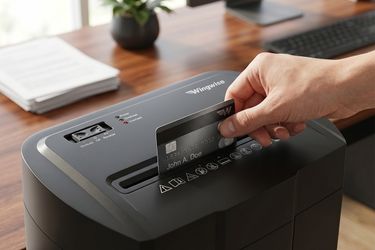
Can Your Shredder Handle Credit Cards and CDs? A Safety Guide
Most people buy a paper shredder to destroy bank statements, tax documents, and other paperwork containing personal information. Then one day, an expired credit card or an old CD lands on the desk, and a common question comes up: Can I shred this too?
The answer depends entirely on the shredder you're using. While many modern home shredders can safely destroy credit cards, not every model is designed to handle CDs or DVDs. Feeding materials your machine wasn't built for can lead to paper jams, dull cutting blades, motor strain, and costly repairs.
Knowing what your shredder can and can't process is just as important as choosing the right security level. Whether you're replacing an old machine or buying your first one, understanding these differences will help you protect both your sensitive information and your investment. So before you feed anything beyond paper into the cutters, let's look at what really matters.
The Mechanism Behind Heavy-Duty Blades
Not every paper shredder is designed to handle the same materials. While standard models are built for everyday paper documents, heavy duty paper shredders feature stronger motors and reinforced steel cutters that can process tougher items like credit cards and, on compatible models, CDs and DVDs.
The difference comes down to cutting power and durability. Plastic cards and optical discs create much more resistance than paper, so shredders designed for these materials use more robust components to maintain smooth, reliable performance without placing unnecessary strain on the motor.
A heavy-duty shredder typically includes:
- Hardened steel cutting blades for improved durability
- A more powerful motor for consistent performance
- Overload protection to help prevent overheating
- Compatibility with paper, credit cards, staples, and, on selected models, CDs and DVDs
However, "heavy duty" doesn't mean a shredder can destroy every material. Always check the manufacturer's specifications before feeding plastic cards or discs into the machine. Choosing a model that's designed for the materials you shred most often helps improve performance, reduce jams, and extend the life of your shredder.
Why You Should Never Force Incompatible Materials
One of the fastest ways to shorten the lifespan of a paper shredder is to use it for jobs it was never designed to do.
It's easy to assume that if a machine can cut through a thick stack of paper, it should also be able to destroy plastic cards or CDs. In reality, these materials behave very differently once they reach the cutting blades.
Plastic cards are denser than paper, while CDs and DVDs are made from rigid polycarbonate that places significantly more stress on both the motor and the cutters. If your shredder isn't rated for these materials, forcing them through the feed slot can create problems almost immediately.
Common issues include:
- Motor overload caused by excessive cutting resistance
- Paper jams created by broken plastic fragments
- Premature blade wear that reduces cutting efficiency
- Increased operating noise and vibration
- Automatic thermal shutdown after overheating
- Permanent damage to internal gears in severe cases
These problems rarely happen all at once. More often, they begin with subtle warning signs—a slower feed speed, unusual sounds, or frequent jams. Ignoring those signals and continuing to shred incompatible materials can turn a minor issue into an expensive repair.
It's also worth remembering that CDs don't simply "cut" the way paper does. As the blades break apart the rigid disc, sharp fragments can be produced. Models that support CD shredding are designed with enclosed cutting chambers to safely contain these pieces, reducing the risk of debris escaping during operation.
What Materials Can Most Home Shredders Handle?
The safest approach is always to follow the manufacturer's recommendations. While capabilities vary by model, the table below provides a general guide.
| Material | Most Standard Home Shredders | Heavy-Duty Compatible Models |
|---|---|---|
| Office paper | ✔ Yes | ✔ Yes |
| Junk mail | ✔ Yes | ✔ Yes |
| Staples | Some models | ✔ Most models |
| Small paper clips | Some models | ✔ Most models |
| Credit cards | Compatible models only | ✔ Commonly supported |
| CDs/DVDs | Usually not | ✔ Selected models |
| Cardboard | ✘ No | ✘ Not recommended |
| Thick plastic items | ✘ No | ✘ Unless specifically approved |
Even if your shredder supports multiple materials, avoid feeding everything at once. For example, inserting a thick stack of paper together with several plastic cards places unnecessary stress on the motor and increases the likelihood of a jam.
A better habit is to shred documents first, then process credit cards or discs separately. This keeps the cutting system working efficiently and helps maintain consistent performance over time.
Regular maintenance is equally important. Tiny paper fibers gradually build up on the cutting blades, increasing friction and making the shredder work harder than necessary. Keeping the cutters properly lubricated helps reduce wear, minimize jams, and maintain smooth operation—especially if your machine regularly handles thicker materials like plastic cards.
Wingwise Shredders Built for Tough Jobs
The best shredder isn't necessarily the biggest one—it's the one that matches the way you work. For most households and home offices, that means choosing a machine that securely destroys everyday documents, runs quietly, and can occasionally handle tougher materials like expired credit cards without constant maintenance.
That's exactly where Wingwise focuses its product lineup. Instead of offering one-size-fits-all solutions, Wingwise provides a range of shredders designed for different security needs, workloads, and workspace sizes.
For Everyday Home Use
If your shredding routine mainly includes bills, bank statements, shipping labels, insurance paperwork, or school records, a compact cross-cut shredder is often the most practical choice. These models provide a strong balance between document security, ease of use, and space-saving design.
Many Wingwise home shredders also include features that make day-to-day use much more convenient, including:
- Quiet operation that helps reduce distractions in home offices.
- Anti-jam technology that automatically responds to overloads before they become frustrating paper jams.
- Compact footprints that fit comfortably beside a desk or under a workstation.
- Multiple sheet capacities, allowing users to choose a model that suits their weekly shredding volume.
For families who regularly receive financial statements, medical documents, or packages with personal information, these features help make shredding a quick habit rather than an occasional chore.
When You Need More Than Paper Shredding
Some users need their shredder to do more than destroy paper. Expired credit cards, old membership cards, employee ID cards, and archived CDs can all contain sensitive personal or business information that shouldn't simply be thrown away.
Instead of forcing these materials through a standard machine, it's worth choosing a model that's specifically designed for them.
Wingwise's heavy-duty and selected high-security shredders are built to process multiple media types, including paper, staples, credit cards, and compatible CDs/DVDs. Their reinforced cutting systems and higher-performance motors make them a better option for users who regularly destroy more than ordinary documents.
If you're comparing models, consider these questions before making a decision:
- Do you mainly shred paper, or do you also need to destroy plastic cards?
- Will you occasionally dispose of CDs or DVDs?
- How many sheets do you typically shred at one time?
- Is quieter operation important if you work from home?
- Do you require P-4 Cross-Cut security, or would P-5 Micro-Cut provide better protection for highly confidential information?
Answering these questions first makes it much easier to select a paper shredder that fits your daily routine instead of paying for features you'll never use—or discovering later that your machine can't handle the materials you need to destroy.
Don't Forget Routine Maintenance
Even the most reliable shredder needs regular care to continue performing at its best.
Every shredding session leaves behind tiny paper fibers and dust that gradually build up on the cutting blades. Over time, this increases friction, making the motor work harder and reducing cutting efficiency. If maintenance is ignored, you may begin to notice slower shredding speeds, more frequent jams, or louder operation.
Regular maintenance helps:
- Keep cutting performance consistent.
- Reduce unnecessary strain on the motor.
- Extend the life of the cutting blades.
- Minimize paper jams.
- Maintain quieter operation.
One of the simplest ways to care for your shredder is by using lubricant sheets. Unlike bottled shredder oil, lubricant sheets are clean, easy to store, and evenly distribute lubrication across the cutters during a normal shredding cycle. There's no measuring, no dripping, and no mess—just feed the sheet into the shredder as you would a regular piece of paper.
For households that shred documents every week, incorporating lubricant sheets into a regular maintenance routine can significantly improve long-term performance and help keep the shredder operating as smoothly as it did on day one.
Final Thoughts
A paper shredder is one of the simplest tools for protecting your personal information, but using it correctly makes all the difference. While many modern shredders can safely destroy credit cards, only compatible models should be used for CDs and DVDs. Taking a few moments to check your machine's specifications before shredding tougher materials can help prevent unnecessary damage and keep your shredder performing reliably for years.
Whether you're looking for a compact shredder for everyday household paperwork or a heavy-duty model that can handle credit cards, CDs, and higher-security document destruction, Wingwise offers solutions designed with home users in mind. Explore the Wingwise collection to find a shredder that fits your needs, and keep it running at peak performance with the right maintenance accessories.
FAQ
Can every paper shredder shred credit cards?
No. Only a paper shredder specifically rated for credit card shredding should be used. Always check the product specifications before inserting plastic cards.
Can heavy duty paper shredders shred CDs and DVDs?
Many heavy duty paper shredders can process CDs and DVDs, but this feature depends on the model. Always confirm compatibility before shredding optical discs.
Will shredding a credit card damage my shredder?
Not if your shredder is designed for plastic cards. Using a model that isn't rated for credit card shredding may overload the motor or wear down the cutting blades more quickly.
Should I choose a Cross-Cut or Micro-Cut paper shredder?
Cross-cut shredders provide excellent security for most household documents, while micro-cut models create much smaller particles for higher levels of information protection.
How often should I lubricate my paper shredder?
For regular home use, lubricating the cutters every few weeks—or after several full bins of shredded paper—helps maintain cutting performance and reduces the risk of jams.
What are the warning signs that I'm shredding incompatible materials?
If your shredder slows down, makes unusual noises, overheats, or jams frequently after shredding plastic cards or discs, stop using those materials immediately and review the manufacturer's recommended media types.

©2025 shopastro All Rights Reserved.