
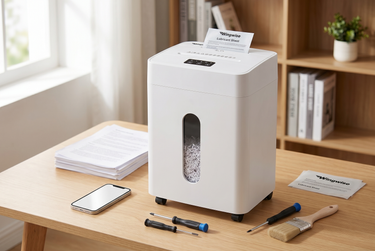
How to Fix Common Shredder Problems: Maintenance & Troubleshooting Tips
Imagine finally tackling that mountain of old tax returns and bank statements on your desk. You feed a stack into the slot, but halfway through, you hear a miserable grinding noise followed by complete silence. We have all been there. Instead of breezing through your office decluttering, you are now wrestling with stuck pages and a blinking red light. Proper shredder maintenance is the secret to avoiding these frustrating interruptions. Whether you use a basic model for junk mail or an advanced, ultra-quiet unit for top-tier privacy, taking care of the blades and motor extends the lifespan of your equipment significantly. Are you ready to get your home office running smoothly again?
Why Shredder Maintenance Matters
When we invest in home office equipment, we often expect it to work flawlessly out of the box for years without a second thought. However, a paper shredder is a highly active mechanical device filled with interlocking solid steel blades, heavy-duty motors, and sensitive optical sensors that work incredibly hard to turn sensitive documents into unreadable confetti. Every single time you destroy an old credit card offer, a printed email, or a utility bill, tiny paper fibers and invisible paper dust accumulate inside the cutting assembly. Without regular attention, this microscopic buildup creates immense friction, putting unnecessary strain on the motor and rapidly dulling the cutting teeth.
This constant mechanical strain is exactly what leads to the most common consumer complaints: excessive, disruptive noise that wakes up the whole house and an ever-increasing frequency of frustrating paper jams. If you rely on a high-security micro-shredder, the cutting mechanism is even more intricate than standard models. These machines cross-cut your documents into thousands of tiny, unreadable particles, providing the ultimate peace of mind against identity theft. However, because the blades are making exponentially more cuts per inch, they require a clean, well-maintained environment to function properly. By understanding the physical demands placed on your machine, you can adopt a few simple daily habits that ensure it remains an ultra-quiet, highly efficient tool for protecting your family's personal information for years to come.
Essential Care Practices for Optimal Shredder Performance
Keeping your equipment in peak condition does not require a degree in mechanical engineering. In fact, routine care is straightforward and takes only a few minutes a month. The absolute most critical aspect of keeping your blades spinning freely and quietly is regular lubrication. Just like a car engine requires fresh oil to reduce friction and heat, your cutting blades need lubrication to slice through thick stacks of paper without resistance.
Here is a breakdown of the best practical steps for everyday care:
- Implement Regular Oiling: You should lubricate your machine every single time you empty the wastebasket, or at a minimum, twice a month. If you process high volumes of paper, increase this frequency. You can use traditional bottled oil by running a thin zigzag bead of it across a standard piece of paper and feeding it through the slot.
- Utilize Lubricant Sheets: For a completely mess-free alternative, shredders & Accessories like Wingwise shredder lubricant sheets are incredibly convenient. They deliver the exact right amount of oil directly to the cutting cylinders without any risk of spilling slippery liquid on your desk or ruining your home office carpets.
- Clear Stubborn Dust Buildup: Always unplug the machine first, then use a standard can of compressed air to gently blow away the paper dust trapped between the blades and the entry sensors. This simple act prevents false "bin full" readings and keeps the auto-feed sensors functioning cleanly.
- Empty the Waste Bin Promptly: Do not wait for the paper scraps to pack tightly against the bottom of the cutting head. When the bin reaches about eighty percent full, take a moment to empty it. Packed paper can easily feed backwards into the blades, causing severe internal jams that are incredibly difficult to clear.
Troubleshooting Common Shredder Problems
Even with the best intentions and meticulous care routines, you might occasionally run into a functional hiccup. The key to fixing a jammed or suddenly unresponsive shredder machine is patience. Yanking forcefully on stuck paper will only strip the delicate plastic gears inside the motor assembly or permanently bend the steel cutting teeth, turning a minor annoyance into an expensive, permanent breakdown. When your equipment stops cooperating, your immediate first step should always be to unplug it entirely from the wall outlet to ensure your physical safety before inspecting the feed slot.
Understanding the root cause of an issue is half the battle. Many common problems are triggered by simple user errors, such as misjudging the thickness of a document stack or pushing the machine past its thermal limits during a massive spring-cleaning session. By learning to identify the auditory and visual cues your device gives you, you can quickly implement the correct fix without needing to call for technical support.
Below is a quick reference guide to diagnosing and resolving the most frequent issues you will encounter in a typical home office setup:
| Problem Encountered | Primary Suspected Cause | Troubleshooting Solution |
|---|---|---|
| Severe Paper Jam | Overfeeding past the maximum sheet capacity or feeding wrinkled, thickly folded documents. | Switch to "Reverse" mode to back the paper out. If stuck, alternate gently between Reverse and Auto. Apply a lubricant sheet to soften the stuck paper fibers. |
| Overheating (Sudden Stop) | Exceeding the machine's continuous run time (duty cycle) during a large project. | Turn the power off, unplug the unit, and wait 30 to 45 minutes for the internal thermal sensor to reset before resuming your tasks. |
| Squeaking or Grinding Noise | Dry, unlubricated blades generating excessive metal-on-metal friction. | Run a dedicated lubricant sheet through the feed slot, then run the machine in reverse for 10 to 15 seconds to distribute the oil evenly across the cylinders. |
| Machine Won't Start at All | The waste bin is slightly open, or the safety entry sensor is blocked by compressed paper dust. | Firmly push the waste bin shut until it clicks. Clean the optical sensor in the paper entry throat with a dry cotton swab to remove dust blockages. |
Proactive Upkeep to Avoid Shredder Malfunctions
Prevention is always less stressful and more time-efficient than troubleshooting. One of the absolute best ways to protect your equipment is to strictly respect its stated physical capacity. If you own a standard 12-sheet home shredder, do not attempt to force fifteen or twenty pages through the slot just to save a few seconds. Count your pages carefully, and remember that heavy-duty staples, thick glossy paper stock, and junk mail envelopes with plastic display windows effectively double the thickness of a standard sheet of copy paper. When you are in doubt about the thickness, it is always safer to feed smaller batches.
You also need to proactively manage the duty cycle, which is the exact amount of time a motor can run continuously before it needs to rest and cool down. Compact machines designed for home environments usually have shorter duty cycles compared to massive commercial office units, so pacing yourself is essential.
To proactively extend the functional life of your device:
- Remove Hidden Hazards: While many modern units feature advanced anti-jam technology and can technically handle standard staples, taking the time to remove heavy-duty staples, large metal binder clips, and sticky adhesive labels prevents long-term blade damage. Adhesives are particularly harmful because they gum up the blades, acting like a magnet for paper dust.
- Pace Your Shredding Sessions: Instead of saving up six months of financial documents for a single, grueling marathon session, try to process smaller batches weekly. This prevents the internal motor from hitting its thermal shutoff limit and preserves the integrity of the plastic gears.
- Listen to Your Machine: Pay close attention to the sound of the motor. If you hear it audibly straining, slowing down significantly, or pitching much lower than usual, that is your immediate cue to stop feeding paper, hit the reverse button, and reduce your stack size.
Seeking Professional Support for Your Shredder
Sometimes, despite meticulous care, proactive maintenance, and proper troubleshooting, a machine simply refuses to function correctly. If you have carefully cleared all visible paper jams, applied ample lubrication to the blades, and allowed the motor to cool down completely overnight, yet the unit remains totally unresponsive or emits terrifying metal-snapping sounds when activated, it is time to stop your DIY repairs. Attempting to open the motor housing yourself is highly dangerous due to the incredibly sharp cutting components and exposed electrical wiring hidden inside. Furthermore, breaking the manufacturer's factory seal will almost certainly void your warranty instantly.
In these frustrating scenarios, your best course of action is to consult your user manual to check your current warranty status and contact the brand's customer support team. A reliable, consumer-focused brand will gladly offer technical guidance, ship replacement parts, or provide a full unit replacement if the defect is internal and covered. Knowing exactly when to step back and ask for expert help ensures you do not accidentally compromise your physical safety or your purchase protection.
Conclusion
Protecting your personal privacy and maintaining a secure home office shouldn't be a frustrating chore. By simply incorporating basic dust cleaning, regular blade lubrication, and mindful paper-feeding habits into your normal routine, you can keep your equipment running quietly and efficiently for many years to come. Say goodbye to disruptive, messy jams and loud, grinding motors that disrupt your workflow. If you are ready to upgrade your home office setup, explore Wingwise's premium collection of personal office gear. From ultra-quiet, anti-jam models to highly secure micro-cut options and essential maintenance accessories, Wingwise provides reliable, beautifully designed solutions tailored directly to your security needs. Secure your peace of mind and shop Wingwise today to find the perfect paper shredder for your family.
FAQ
How often should I lubricate my home shredder?
You should lubricate your device every time you empty the waste bin, or at least twice a month. Using Wingwise lubricant sheets is an incredibly easy way to keep your home shredder running smoothly without the frustrating mess of traditional bottled oils.
Can I use WD-40 or canola oil for shredder maintenance?
No, you should never use aerosol lubricants like WD-40, cooking oils, or motor oil. These are severe fire hazards when exposed to friction heat and can permanently damage the internal components. Always use formulated oil or dedicated shredders & Accessories designed specifically for this exact purpose.
Why does my micro-shredder jam more easily than my old machine?
A micro-shredder cuts paper into exponentially smaller pieces for maximum security, which inherently creates more paper dust and physical friction. Because of this complex mechanism, they require more frequent lubrication and strict adherence to sheet capacity limits to prevent jams.
What is the maximum capacity of a standard paper shredder?
Capacity varies widely by model, but a typical home unit is often a 10-sheet or 12-sheet paper shredder. Always check your specific user manual and remember that thickly folded paper or junk mail envelopes count as multiple sheets.
Why did my shredder machine suddenly stop working while cutting?
If your shredder machine stops abruptly in the middle of a job, it highly likely overheated and triggered its internal thermal protection sensor. Simply unplug the unit, let it cool down undisturbed for about 30 to 45 minutes, and it should automatically reset and resume normal operation.

AAA
©2025 Wingwise All Rights Reserved.