
4 Signs It's Time to Replace Your Old Office Paper Shredder
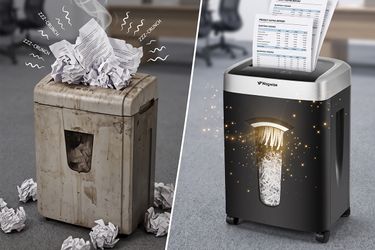
An old shredder can seem harmless until a simple stack of paperwork turns into a noisy, frustrating chore. If your office paper shredders take longer to process documents, jam more often, or no longer provide the security you need, it may be time for an upgrade. But how do you know when maintenance is no longer enough and replacement makes more sense?
Strange Noises and Slow Shredding
A paper shredder should make some noise, but it shouldn't sound like it's struggling with every sheet. Grinding, squeaking, rattling, or unusually loud operation can be a sign that the cutting blades or motor are under excessive strain.
Over time, paper dust and small debris can build up around the cutting mechanism. Lack of lubrication can also increase friction between the blades. As resistance grows, the motor has to work harder, which can make shredding noticeably slower.
A few changes are worth paying attention to:
- The shredder takes longer to pull in paper: The feed mechanism may be struggling to maintain normal cutting performance.
- The motor sounds strained: This can indicate excessive friction or an aging motor.
- The machine becomes noticeably louder: If your once-quiet shredder now interrupts calls or conversations, its components may be wearing down.
- Paper comes out unevenly: Dull or poorly maintained cutting blades can affect consistent shredding.
Before replacing the machine, try basic maintenance. Empty the bin, remove visible paper debris, and use dedicated shredder lubricant sheets according to the manufacturer's instructions. Regular lubrication can reduce friction and help maintain smoother operation.
However, if strange noises and slow performance continue after maintenance, the problem may be more than simple buildup. At that point, continuing to rely on an aging machine may cost you more time than replacing it.
Frequent Jams and Overheating
Few things are more annoying than feeding a document into your shredder only to hear the motor stop halfway through. Occasional jams can happen when you exceed the sheet capacity, but frequent jams are a different story.
Older office shredders can become increasingly sensitive to paper volume as their blades, sensors, and internal components wear. If you regularly have to reverse the machine, pull out scraps of paper, and restart it, your current model may no longer be suitable for your workload.
Overheating is another warning sign. Every shredder has a recommended continuous runtime. When the motor runs for too long, thermal protection may shut the machine down until it cools. That's normal when you're processing a large amount of paper at once. The concern is when an older machine begins overheating during relatively small jobs.
Think about your actual workload. If you only shred a few bills and envelopes each week, a compact home model may be sufficient. But if you're regularly clearing tax records, financial statements, work documents, or several months of accumulated paperwork, you need enough sheet capacity and runtime to handle that workload comfortably.
Newer models can also make everyday shredding less frustrating. For example, Wingwise offers models with anti-jam systems designed to detect overloading and reverse the feed, while some models provide extended runtimes for heavier workloads.
If your old shredder constantly turns a five-minute job into a half-hour battle, that's a pretty good reason to consider replacing it.
Security Level Is Too Low
Your shredder may still be working perfectly—and still be the wrong shredder for your needs.
This often happens when someone buys a basic machine for occasional paperwork and later starts handling more sensitive information. A strip-cut shredder may be adequate for junk mail or ordinary drafts, but it offers less protection than cross-cut or micro-cut technology.
For everyday household paperwork, a P4 cross-cut shredder can provide a useful balance of security and performance. If you regularly dispose of tax records, medical documents, financial paperwork, legal files, or other sensitive information, a P5 micro-cut shredder provides a higher level of protection by reducing documents into much smaller particles.
| Security Level | Cut Type | Typical Use |
| P2 | Strip-Cut | Junk mail and non-sensitive documents |
| P4 | Cross-Cut | Bills, bank statements, personal records |
| P5 | Micro-Cut | Tax, legal, medical, and financial documents |
| P7 | High-Security Micro-Cut | Highly sensitive or specialized information |
So ask yourself: Has the type of information you're shredding changed since you bought your machine?
If the answer is yes, upgrading your security level may be more important than simply replacing an old machine with another model that offers the same level of protection.
For many households and home offices, moving from basic strip-cut shredding to a cross-cut or micro-cut model is a practical way to improve document security without making daily use unnecessarily complicated.
Upgrading to a Better Model
Sometimes the clearest sign that you need a new shredder is simply that your current one no longer fits your routine.
Maybe you're working from home more often. Maybe your family has accumulated years of paperwork. Or perhaps you're dealing with more sensitive documents than you did when you first purchased your shredder. In these situations, replacing an old office paper shredder with a model suited to your current workload can make a noticeable difference.
When comparing new office shredders, look beyond sheet capacity alone. Consider the complete user experience:
- Security level: Choose P4 cross-cut for many everyday personal documents, or consider P5 micro-cut when stronger privacy protection is important.
- Sheet capacity: A 10- to 12-sheet model can be a practical choice for many home offices, while heavier workloads may call for higher capacity.
- Noise level: Quiet operation is especially valuable if you work in a bedroom, shared office, or small apartment.
- Anti-jam protection: This can save time and reduce the frustration of manually removing stuck documents.
- Runtime: Match continuous runtime to how much paper you typically process at once.
- Bin capacity: A larger pull-out bin means fewer interruptions during larger shredding jobs.
- Maintenance: Easy maintenance and compatible lubricant sheets can help keep the cutting mechanism working smoothly.
Wingwise's current lineup includes compact home-office models, auto-feed options, P4 cross-cut shredders, and P5 micro-cut models for users who need stronger document protection. Some models are rated at 55–58 dB, while heavier-duty options offer substantially longer runtimes for demanding workloads.
And don't overlook maintenance after upgrading. Lubricant sheets are a simple way to reduce blade friction and help maintain smooth shredding performance. If you frequently shred documents, making lubrication part of your routine can help reduce the risk of jams and premature wear.
In other words, a replacement isn't necessarily about buying the biggest machine you can find. It's about finding one that matches how you actually use a shredder today.
Conclusion
If your old shredder is noisy, slow, constantly jamming, overheating, or no longer provides enough document security, it's probably time to move on. A newer model can give you quieter operation, better protection, and fewer interruptions in your daily routine.
Explore Wingwise to find a home-friendly shredder that fits your workload and privacy needs—and keep it performing smoothly with the right shredder lubricant sheets.
FAQ
How long should an office paper shredder last?
With regular maintenance and reasonable use, a quality shredder can last for years. Frequent jams, unusual noises, and declining performance are signs it may need replacement.
Is a micro-cut shredder better for home use?
A micro-cut shredder offers stronger privacy protection than a basic strip-cut model and is especially useful for tax, financial, medical, and legal documents.
How do I stop my office shredder from jamming?
Avoid exceeding its sheet capacity, remove paper debris regularly, and use shredder lubricant sheets as recommended. An anti-jam model can also make frequent shredding easier.
How many sheets should a home paper shredder handle?
For many households and home offices, a 10- to 12-sheet shredder offers a practical balance of capacity, compact size, and everyday performance.
Are lubricant sheets necessary for a paper shredder?
Regular lubrication can reduce friction, support smoother cutting, and help minimize paper jams. They are particularly useful for machines that are used frequently.
When should I upgrade from a cross-cut to a micro-cut shredder?
Consider upgrading when you regularly handle highly sensitive tax, medical, financial, legal, or confidential work documents and want a higher level of physical document destruction.

©2025 shopastro All Rights Reserved.