
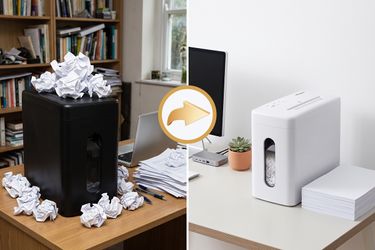
Upgrading Your WFH Setup: The Best Shredders for Small Offices
Remote and hybrid work turned kitchen tables and spare bedrooms into functioning small offices — and that means real business paperwork: signed contracts, client invoices, tax records, even the occasional NDA. If your team is still running that through a $30 shredder from the big-box store, it's probably time to look at what actual office paper shredders are built to handle. Here's how to tell when you've outgrown a basic model, what features actually matter for a SOHO setup, and which of the best shredders for small offices are worth the upgrade.
When a Basic Home Shredder is No Longer Enough
Most personal shredders are designed around occasional use — a few bills, an old bank statement, maybe a birthday card with too much personal information on it. They're built for bursts of light activity, not for a workday. A small office generates a very different volume and type of paperwork, and the cracks tend to show fast:
- Frequent jams when you try to feed more than a couple of sheets at once
- The motor overheating within minutes, forcing you to stop mid-task and wait
- A bin that fills up halfway through a routine document purge
- Only strip-cut shredding available, which doesn't meet basic security expectations for client or financial records
- No auto-reverse or jam-clearing function, so every paper jam becomes a five-minute manual fix
These aren't defects — they're just the limits of a machine designed for occasional home use being asked to do office-level work. A good rule of thumb: if you're shredding almost daily, handling more than a handful of pages at a time, or destroying anything with client or financial information on it, you've moved past what a basic shredder was designed for. If you want a fuller breakdown of what to look for before you buy, our shredder buying guide walks through the full range of options, from entry-level to high-security machines.
Key Features for SOHO (Small Office/Home Office) Shredders
Not all office paper shredders are built the same, and the difference usually shows up in a handful of specs rather than the price tag alone. When shopping for a SOHO setup, pay attention to:
- Cut type — cross-cut or micro-cut for genuine document security, rather than the strip-cut shred typical of basic personal models. Strip-cut paper can, in theory, be reassembled; cross-cut and micro-cut cannot.
- Security level (P-rating) — most routine SOHO paperwork is well served by P-4, while offices handling client financial or legal documents should consider stepping up to P-5 for finer particle size.
- Sheet capacity — enough sheets per pass that you're not feeding paper one page at a time between meetings or calls.
- Bin size — a larger pull-out bin means fewer interruptions to empty it during a busy week, and less risk of it overflowing while you're mid-task.
- Noise level — matters more than people expect in an open-plan home office, a shared coworking space, or anywhere near a video call.
- Safety features — auto-reverse jam clearing, overload protection, and safety sensors keep the machine running instead of restarting constantly or shutting down mid-task.
None of these features matter in isolation — it's the combination that determines whether a shredder actually fits how your office works. A machine with a great P-rating but a tiny bin and a two-minute run time will still frustrate you during a real cleanup session. Because these specs vary quite a bit between models, it's worth taking a minute to compare shredder models side by side before deciding which combination of features actually fits your workload.
Continuous Run-Time vs. Cool-Down Periods Explained
Continuous run-time is how long a shredder's motor can operate before it needs to rest. On basic machines, that's often just 2–5 minutes, followed by a 20–30 minute cool-down — workable for a handful of pages, but not for a real office task like an end-of-quarter document purge or clearing out a filing cabinet before an audit.
This is one of the most overlooked specs when people shop for office paper shredders, because it rarely shows up on the front of the box. In practice, it's often the difference between finishing a task in one sitting and finishing it over three separate attempts spread across an afternoon. If you regularly shred in batches rather than one page at a time, run-time matters more than almost any other spec on the list.
For SOHO use, look for a motor rated for meaningfully longer continuous operation, so you're not babysitting the machine between short bursts. Wingwise's extended runtime shredder is built specifically around this problem, letting you work through an entire folder of documents without stopping to let the motor cool down.
Wingwise Top Picks for Small Business Owners
Different SOHO setups have different bottlenecks — the busiest office isn't always the one with the most paper, it's the one where shredding keeps interrupting other work. Here's how to match the need to the machine:
| If your priority is... | Look for | Wingwise model |
|---|---|---|
| High daily document volume | Auto-feed, minimal hands-on time | Auto Feed Long-Runtime Office Shredder |
| Shared or open-plan workspace | Low operating noise | Ultra Quiet Heavy Duty Shredder |
| Everyday standard office use | Reliable capacity at a fair price | Heavy Duty Standard Home Office Shredder |
For teams generating a steady stream of paperwork throughout the day, an auto-feed office shredder removes the manual feeding bottleneck almost entirely — you load a stack and let the machine work through it on its own, freeing you up to actually get on with the rest of the day.
If noise is the bigger concern — say, your desk sits a few feet from where client calls happen — prioritizing a quieter model will do more for your daily workflow than chasing a slightly higher P-rating you don't actually need.
Conclusion
Upgrading your WFH setup usually starts with the obvious things — a second monitor, a better chair, faster wifi. Document security tends to get overlooked until a jam, an overheated motor, or a pile of unshredded contracts makes it impossible to ignore. But for any small office handling client, financial, or legal paperwork, it deserves the same attention as the rest of your setup.
The good news is that choosing the right machine isn't complicated once you know what to look for: match the cut type and P-rating to the sensitivity of what you're shredding, make sure the run-time and bin size fit how often you actually shred, and factor in noise if you're working in a shared or open space. Get those four things right, and you'll spend a lot less time thinking about your shredder — which is really the point. You can browse the full lineup of heavy-duty shredders to compare capacity and features across every model built for office-level use, and find the one that fits your workload rather than the other way around.

©2025 shopastro All Rights Reserved.